
Buying a home in California often means buying into a school district. But here's the thing most buyers discover too late: the listing says one school, and the district says another.
School assignments can change. Boundaries shift. Open enrollment policies vary wildly from one district to the next. And that "great schools" rating you saw online? It might not even apply to the address you're considering.
This guide won't tell you which schools are "good" or "bad." That's not how thoughtful homebuying works. Instead, you'll learn how to research school districts and boundaries in California using primary sources—the same tools district administrators and enrollment offices use. By the end, you'll have a repeatable workflow to verify school assignments, understand boundary policies, and make informed decisions based on your family's actual priorities.
Why Primary Sources Matter More Than Third-Party Ratings
Third-party school rating sites aggregate data into simple scores. Convenient? Sure. Complete? Rarely.
Those scores typically reflect standardized test performance and sometimes graduation rates. They don't capture program offerings, language immersion options, special education services, arts programs, or the dozen other factors that might matter to your family. [1]
More importantly, rating sites sometimes lag behind boundary changes. A home that fed into one elementary school last year might feed into a different one this year. The only way to know for certain is to verify directly with the district.
California has over 1,000 school districts. [2] Each sets its own attendance boundaries, transfer policies, and enrollment procedures. What works in Sacramento Unified won't necessarily apply in Elk Grove Unified, even though they share a border.
Primary sources eliminate the guesswork.

The California School District Hierarchy: What You're Actually Researching
Before diving into tools, understand how California organizes its schools:
Elementary school districts typically serve grades K–6 or K–8
High school districts serve grades 9–12
Unified school districts serve K–12 under one administration
Some areas have overlapping governance. A home might sit within an elementary district and a separate high school district. This matters because you'll need to verify boundaries with each district independently.
The California Department of Education maintains the official directory of all districts, including contact information and district type. [3]
Your Source-of-Sources Toolkit
1. California School Directory (CDE)
What it is: The California Department of Education's searchable database of every public school and district in the state.
What you'll find: School addresses, grade levels served, district contact information, and links to individual school websites.
How to use it: Start here to identify which district governs the address you're considering. Note the district's main phone number and website—you'll need both. [3]
2. District Boundary Locator Tools
Most California school districts now offer online boundary lookup tools. You enter an address, and the system returns the assigned schools.
Where to find them: Visit the district's official website and look for:
"Enrollment" or "Registration" section
"Boundary Locator" or "School Finder"
"Attendance Areas" page
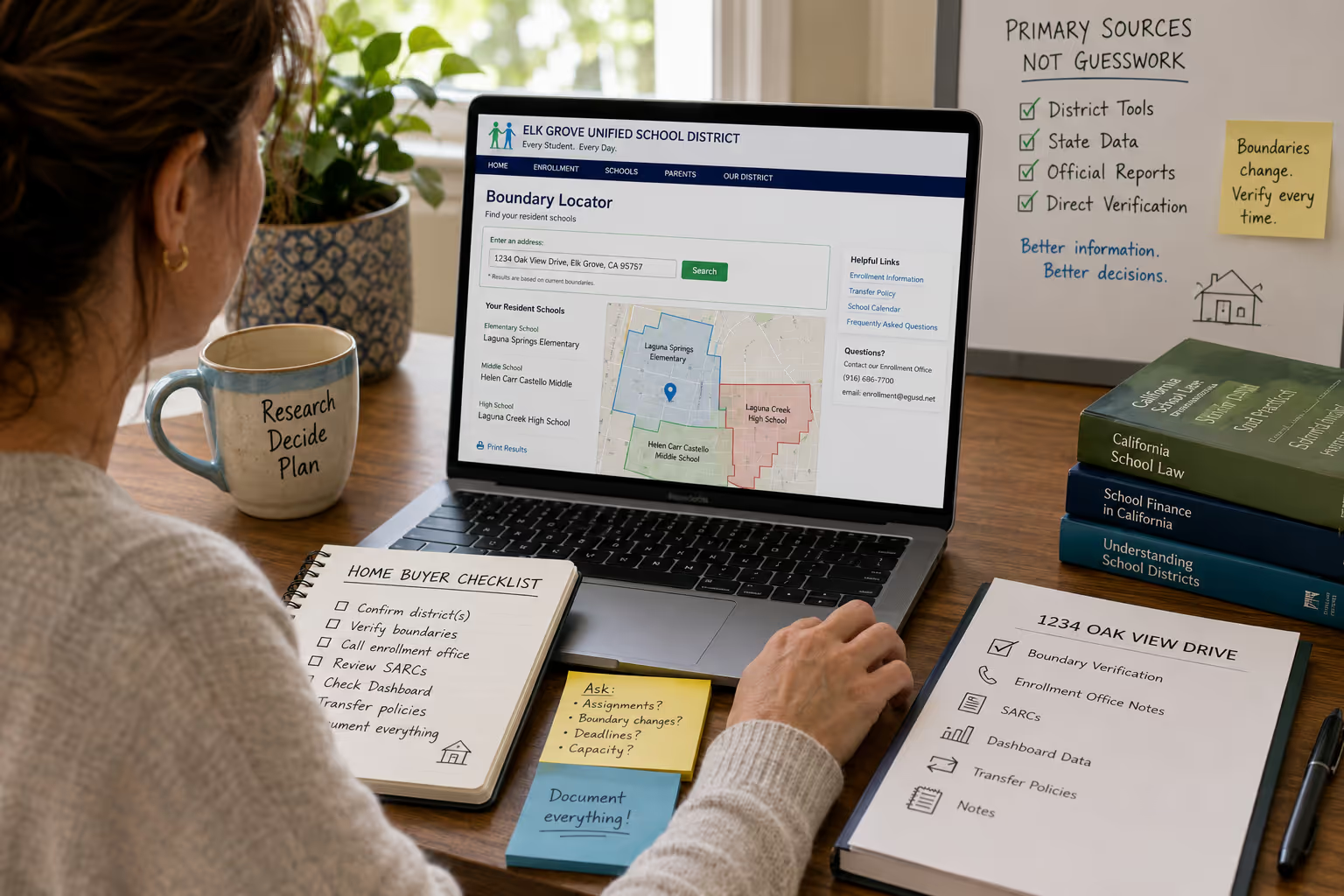
For example, Elk Grove Unified School District maintains an address lookup tool that shows assigned elementary, middle, and high schools for any address within district boundaries. [4]
Critical step: Always use the district's own tool, not a third-party site. District tools pull from current boundary data. Third-party sites may cache outdated information.
3. California School Dashboard
What it is: The state's official accountability system, maintained by the California Department of Education.
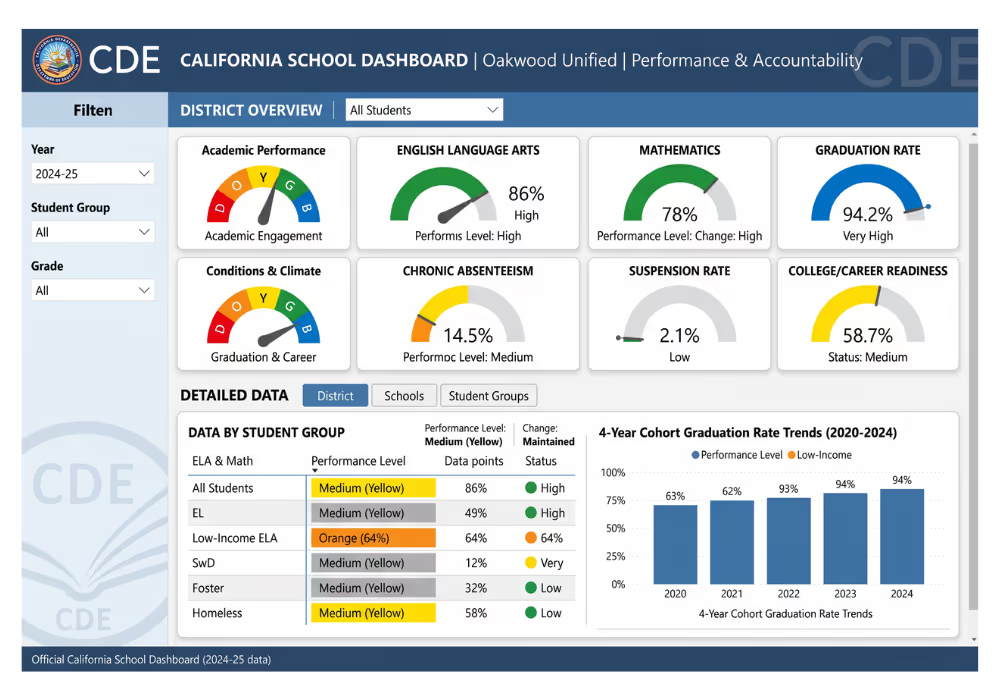
What you'll find: Performance data across multiple measures—not just test scores. The Dashboard reports on:
Academic performance (English Language Arts and Mathematics)
Graduation rates
Chronic absenteeism
Suspension rates
College/career readiness
English learner progress [5]
Why it matters: The Dashboard breaks down data by student group, letting you see how schools serve different populations. This is public, state-verified data—not an algorithm's interpretation.
How to access: Search by school name or browse by district at the California Department of Education's Dashboard site. [5]
4. School Accountability Report Cards (SARCs)
What they are: Annual reports that every California public school must publish, covering school conditions, teacher qualifications, curriculum, and more.
What you'll find: Class sizes, teacher credentials, instructional materials, facility conditions, and budget information. [6]
Where to find them: Each school's SARC is typically posted on the school website. You can also request copies from the district office.
5. District Open Enrollment and Transfer Policies
Here's where many buyers get tripped up. Just because a home falls within a school's boundary doesn't mean that's your only option—or that enrollment is guaranteed.
California's intradistrict and interdistrict transfer laws allow families to request attendance at schools outside their assigned area, subject to capacity. [7]
What to research:
Intradistrict transfers: Can you request a different school within the same district?
Interdistrict transfers: Can you attend a school in a neighboring district?
Magnet and specialty programs: Do schools offer programs with separate application processes?
Capacity policies: How does the district handle oversubscribed schools?
District websites typically post transfer application windows, deadlines, and approval criteria. Call the enrollment office if policies aren't clear online.
A Step-by-Step Verification Workflow
Use this process for every address you're seriously considering:
Step 1: Identify the Governing District(s)
Enter the address into the California School Directory to confirm which district has jurisdiction. Note whether elementary and high school districts are unified or separate.
Step 2: Use the District's Official Boundary Tool
Navigate to the district website and locate the boundary lookup. Enter the exact street address. Screenshot or save the results—boundaries can change between school years.
Step 3: Verify Directly with the District
Call or email the district's enrollment office. Confirm:
Current school assignments for the address
Whether any boundary changes are planned
Enrollment procedures and deadlines
This step catches situations where online tools haven't been updated or where exceptions apply.
Step 4: Pull the School Accountability Report Card
Review the SARC for each assigned school. Note anything relevant to your priorities: class sizes, program offerings, facility conditions.
Step 5: Check the California School Dashboard
Review Dashboard data for a multi-dimensional view of school performance. Pay attention to trends over multiple years, not just the most recent data.
Step 6: Research Transfer Options
If flexibility matters to you, review the district's transfer policies. Understand application windows and approval likelihood.
Step 7: Document Everything
Keep a folder (digital or paper) with:
Boundary verification screenshots
District contact names and dates of conversations
SARC and Dashboard printouts
Transfer policy summaries
This documentation protects you if questions arise after purchase.
Common Mistakes Buyers Make
Trusting listing descriptions. Real estate listings often name nearby schools without confirming current assignments. Always verify independently.
Assuming boundaries are permanent. Districts redraw boundaries periodically to balance enrollment. A school assignment today isn't guaranteed for future years.
Overlooking district-level policies. Two schools in the same district might have vastly different cultures, but they share the same board, budget priorities, and administrative policies. Research at both levels.
Ignoring open enrollment. Some families have more options than they realize. Others assume transfers are easy when capacity is actually tight.
Relying solely on ratings. A single number can't capture whether a school fits your child's learning style, interests, or needs.
Questions to Ask the Enrollment Office
When you call the district, come prepared:
Can you confirm the current school assignments for [address]?
Are any boundary changes under consideration for this area?
What is the enrollment deadline for the upcoming school year?
What documentation is required for enrollment?
How does the intradistrict transfer process work?
Are there capacity limitations at any assigned schools?
What specialty programs or magnet schools are available?
Take notes. Ask for the name of the person you spoke with and the date.
Understanding Open Enrollment in California
California law gives families some flexibility in school choice, but it's not unlimited.
Intradistrict transfers allow students to attend a school within their district of residence that differs from their assigned school. Districts must establish policies for these requests and typically approve based on available capacity. [7]
Interdistrict transfers allow students to attend school in a district other than where they reside. Both the district of residence and the receiving district must approve. Some districts have agreements that streamline this process; others evaluate requests case by case. [7]
Key factors affecting approval:
Available space at the requested school
Program capacity (especially for specialized programs)
Sibling enrollment
Childcare arrangements
Employment location of parents
Transfer approvals are generally not guaranteed, and policies vary significantly between districts.

Building Your School Research Checklist
Before making an offer on a home, verify:
| Task | Source | Completed |
| Confirm governing district(s) | CDE School Directory | ☐ |
| Verify assigned schools via boundary tool | District website | ☐ |
| Call enrollment office to confirm | District enrollment office | ☐ |
| Review School Accountability Report Cards | School/district website | ☐ |
| Check California School Dashboard | CDE Dashboard | ☐ |
| Research transfer policies | District website/enrollment office | ☐ |
| Document all findings | Personal records | ☐ |
What This Research Won't Tell You
This workflow gives you verified, primary-source data. It doesn't tell you:
Whether a school is "right" for your child
How your family will experience the school community
What the school culture feels like day-to-day
Whether programs will exist in five years
Those questions require different research: visiting schools, talking to current families, attending school board meetings, and reviewing strategic plans. Data informs decisions. It doesn't make them for you.
Making This Research Part of Your Home Search
School research adds time to your home search. That's a feature, not a bug.
Some buyers prioritize school assignments heavily. Others have more flexibility—perhaps they're considering private schools, homeschooling, or have children who've already graduated. Neither approach is wrong.
What matters is making decisions based on accurate information from primary sources, not assumptions based on outdated listings or third-party scores.
If school assignments are a significant factor in your home purchase, build verification into your process early. Don't wait until you're under contract to discover the boundary map has changed.
Ready to Define Your Priorities?
School research is one piece of a larger puzzle. Location decisions involve commute patterns, neighborhood amenities, housing costs, and a dozen other factors unique to your family.
If you're buying in the Greater Sacramento area and want help thinking through your priorities—schools included—request a consult. We can walk through your criteria, point you toward the right primary sources, and help you build a search strategy that makes sense for your situation.
Frequently Asked Questions
How often do California school district boundaries change?
Boundary changes vary by district. Some districts review attendance areas annually; others go years without modifications. Changes typically occur to balance enrollment across schools or accommodate new residential development. Contact your district's enrollment office to ask about any pending boundary reviews.
Can I rely on the school listed in a home's MLS description?
Not as your sole source. Listing descriptions sometimes reference nearby schools without confirming current boundary assignments. Always verify directly with the district's official boundary lookup tool and follow up with a call to the enrollment office.
What's the difference between the California School Dashboard and third-party rating sites?
The California School Dashboard is the state's official accountability tool, reporting verified data across multiple performance measures for student groups. Third-party sites create their own scoring algorithms, which may weight certain factors differently and may not reflect the most current data.
Does living within a school's boundary guarantee enrollment?
Generally, yes—students have the right to attend their assigned neighborhood school. However, some specialized programs within schools may have separate application processes and capacity limits. Verify program-specific enrollment with the district.
How do I find out if a school offers specific programs like dual immersion or STEM?
Start with the school's website and School Accountability Report Card. For detailed program information, contact the school directly or review district curriculum guides. Specialty programs often have their own enrollment procedures.
About This Guide
This article was developed for homebuyers navigating school research in California, drawing on publicly available resources from the California Department of Education, district enrollment offices, and state accountability systems. The workflow reflects standard practices for verifying school assignments and understanding district policies—the same process enrollment administrators use. For personalized guidance on buying a home in the Greater Sacramento area, including Elk Grove and surrounding communities, consult with a local real estate professional who understands both market conditions and the research process.
Works Cited
[1] National Association of REALTORS — "How to Handle Client Questions About Schools and Neighborhoods." https://www.nar.realtor/magazine/broker-news/network/how-to-handle-client-questions-about-schools-and-neighborhoods
[2] California Department of Education — "California School Directory." https://www.cde.ca.gov/schooldirectory
[4] Elk Grove Unified School District — "School Locator." https://www.egusd.net/
[5] California Department of Education — "California School Dashboard." https://www.caschooldashboard.org/
[7] California Department of Education — "Interdistrict Attendance." https://www.cde.ca.gov/sp/eo/id/


